Hey there,
when working with Master Images in a Virtual Desktop environment you also want to update the users when something is fixed or new software was installed/updated. Especially in a QA/Staging environment you want to inform the users that they should test new changes and where to report any problems with the new Master Image.
The most common ways would be to send an informational E-Mail to every user. But we all know that these E-Mail’s sooner or later will be ignored. A posting on the Intranet, Teams Channel etc. can also easily go unnoticed.
But how about launching a Powershell Script on Logon to your Virtual Desktop showing a Message Box with the information that you want to publish? Like this:
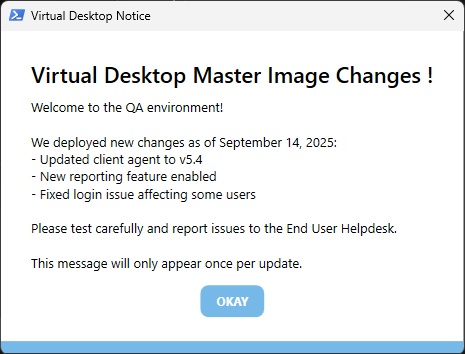
What the script does:
- When placed as a Logon Script via GPO it will run before the desktop is displayed
- It will show the Message Box with the information
- The user must click on the “Okay” Button to close the Message Box (Button Text can be changed in the script)
- The script will write an entry into the user registry with a defined value (Value can be changed in the script)
- On the next logon the script will check if that registry entry is found, and if so skip showing the Message Box
The registry key will make sure that the user will only see the message once and not be annoyed by it every logon. Since the Message Box will be shown bevor the desktop loads, we will also make sure that the user will not ignore it.
You can configure the script by changing the Registry Key Value that will be set, the Text that will be displayed and the color of the bottom line of the Message Box.
The Powershell Script can be found on my GitHub: https://github.com/ITOpsInTheCloud/MasterImageNoticeScript
The script was vibe coded, so I do not take guarantee that everything will work in your environment or maybe the script even can be re-written with fewer lines ;)
I hope that this will help anyone to deliver a better experience for your users!
Till next time!
Christian